Converting EDI Tutorial
Convert Tab Delimited to EDI
Recently, we got the following customer inquiry: "I am a DataDirect XQuery user, and I'm successfully using your product to create XML-based reports from incoming EDI messages. Now I'm in need to do something somewhat different: it may happen that my company receives tab-delimited messages, and those messages need to be translated to EDI X12 831, rather than converted to XML. Can your product help me handling tab-delimited to EDI conversions?". The following tutorial explains how to do just this.
Tab Delimited to EDI
Previous tutorials have already covered how to use DataDirect XQuery to access tab-delimited files using the XML Converters technology, let's see how this would work. Consider the following tab-delimited file:
id description quantity unitprice001 Telephone 1 23.00002 Desk 1 129.00003 Keyboard 2 21.00The following XQuery will return, for example, all the description fields in the tab-delimited input message:
<items> {for $item in doc("converter:TAB:first=yes?file:///c:/sample.tab")//rowreturn $item/description} </items>
The result is:
<items><description>Telephone</description><description>Desk</description><description>Keyboard</description></items>
That shows that we can handle a tab-delimited file in DataDirect XQuery and generate XML; but it doesn't help much our user: he needs to output EDI.
But we know how to do that; A previous tutorial has shown how you can create EDI messages from XQuery. We just need to apply the same idea to our example; the following XQuery uses the incoming tab-delimited file to apparently generate an XML fragment consistent with a specific vocabulary; that vocabulary is what the underlying XML Converters technology knows how to translate in the corresponding EDI message (an X12 832 message in this case, which is a price/sales catalog). The serialization option at the beginning of the XQuery is instructing DataDirect XQuery to output a raw EDI message rather than XML; that way we are moving data from a tab-delimited file format into an EDI message manipulating it as if it was all XML, but without ever materializing it as XML! Many of the EDI fields typically specified are omitted here; but this example will run if you want to see how it works.
declare option ddtek:serialize "method=EDI,long=yes";<X12><ISA><ISA06-InterchangeSenderId>1515151515</ISA06-InterchangeSenderId><ISA08-InterchangeReceiverId>5151515151</ISA08-InterchangeReceiverId><ISA11-RepetitionSeparator>^</ISA11-RepetitionSeparator><ISA13-InterchangeControlNumber>000032123</ISA13-InterchangeControlNumber><ISA14-AcknowledgmentRequested>0</ISA14-AcknowledgmentRequested><ISA15-UsageIndicator>P</ISA15-UsageIndicator><ISA16-ComponentElementSeparator>*</ISA16-ComponentElementSeparator></ISA><GS><GS01-FunctionalIdentifierCode>CT</GS01-FunctionalIdentifierCode><GS02-ApplicationSendersCode>9988776655</GS02-ApplicationSendersCode><GS03-ApplicationReceiversCode>1122334455</GS03-ApplicationReceiversCode> <GS06-GroupControlNumber>128</GS06-GroupControlNumber><GS07-ResponsibleAgencyCode>X</GS07-ResponsibleAgencyCode><GS08-VersionReleaseIndustry>004030</GS08-VersionReleaseIndustry></GS><TS_832><ST><ST01-TransactionSetIdentifierCode>832</ST01-TransactionSetIdentifierCode><ST02-TransactionSetControlNumber>12345</ST02-TransactionSetControlNumber></ST><BCT><BCT01-CatalogPurposeCode>CP</BCT01-CatalogPurposeCode><BCT02-CatalogNumber>GOV56789</BCT02-CatalogNumber><BCT10-TransactionSetPurposeCode>00</BCT10-TransactionSetPurposeCode></BCT>{ for $row in doc('converter:TAB:first=yes?file:///c:/sample.tab')/table/row return <GROUP_5><LIN><LIN02-ProductServiceIdQualifier>MF</LIN02-ProductServiceIdQualifier><LIN03-ProductServiceId>{$row/id/text()}</LIN03-ProductServiceId><LIN07-ProductServiceId>{$row/description/text()}</LIN07-ProductServiceId><LIN09-ProductServiceId>{$row/quantity/text()}</LIN09-ProductServiceId></LIN><GROUP_6><CTP><CTP03-UnitPrice>{$row/unitprice/text()}</CTP03-UnitPrice></CTP></GROUP_6></GROUP_5> }<SE/> </TS_832><GE/></X12>
And here is the resulting output:
ISA+00+ +00+ +ZZ+1515151515 +ZZ+5151515151+080129+1710+U+00000+000032123+0+P+*'GS+CT+9988776655+1122334455+20080129+1710+128+X+004030'ST+832+12345'BCT+CP+GOV56789++++++++00'LIN++MF+001++++Telephone++1'CTP+++23'LIN++MF+002++++Desk++1'CTP+++129'LIN++MF+003++++Keyboard++2'CTP+++21'SE+9+12345'GE+1+128'IEA+1+000032123'
The beauty of this approach is that you can use it in conjunction with all the other data aggregation capabilities of DataDirect XQuery, like possibly adding data to the outgoing EDI message which is not available in the incoming tab-delimited file but available inside a relational database (like a encoded field that may need to be looked up in a table); and this will all work taking advantage of the performance and scalability features of DataDirect XQuery and XML Converters: the example above will seamlessly stream from tab-delimited to EDI without ever allocating in memory for than a few items per time.
Converting TSV, CSV, EDI, or Anything
The same technique outlined in this tutorial applies to all the data sources supported by DataDirect XQuery and XML Converters, so start converting data today by downloading a free trial today.
EDI Conversion File Polling Service in Java
This is a sample Java service which scans a directory, and upon seeing new EDI files, converts them into XML files. There is a corresponding .Net version of this program also.
EDI Service Details
EDI files are often dropped into a directory, with the intention that some program will iterate through them and convert them. It's possible that they were placed here by another program across a network share or via FTP, or another application on this same directory.
This service polls a directory, whose name is given on the command line, every 15 seconds. If it sees a file whose name ends in ".edi" that hasn't been converted into a corresponding ".xml" file, it does so.
If there are any errors, the partial ".xml" file is removed, and instead a file with the suffix ".bad" is created, containing the text of the error.
The program will terminate if a file called STOP is created in the scan directory.
A log of the actions is written to the console. That log might look something like this:
2007-12-27T17:02:14 Scanning c:\inbox2007-12-27T17:02:14 Found 4 files2007-12-27T17:02:14 Converting 00203394.edi2007-12-27T17:02:15 Converted 00203394.edi2007-12-27T17:02:15 Converting 831.edi2007-12-27T17:02:15 Converted 831.edi2007-12-27T17:02:15 Converting order.edi2007-12-27T17:02:15 Error on order.edi2007-12-27T17:02:15 Converting sx.edi2007-12-27T17:02:15 Converted sx.edi2007-12-27T17:02:15 Sleeping2007-12-27T17:02:30 Scanning c:\inbox2007-12-27T17:02:14 Found 4 files2007-12-27T17:02:30 Sleeping
EDI File Polling Service Implementation in Java
First, set up the package, imports, and initialization code.
package com.ddtek.tutorial;import java.io.*;import java.text.SimpleDateFormat;import java.util.Date;import javax.xml.transform.stream.*;import com.ddtek.xmlconverter.*;publicclassScanner {staticpublicvoidmain(String[] args) {newScanner(args[0]);}
Also, a small utility function to return the date/time for the logging output.
staticprivateSimpleDateFormat m_sdf =newSimpleDateFormat("yyyy-MM-dd'T'HH:mm:ss");staticprivateString now() {returnm_sdf.format(newDate());}
Java doesn't have a way to natively poll for changes in a filesystem structure (at least not until something like NIO.2 passes to, among other things, add watch events to Java), so we need to periodically poll and look for changes.
Since we'll need one later, we instantiate the ConverterFactory. This same one will be used throughout the execution of the program.
We look for the presence of a file called STOP. If we see that, we just quit. This provides a clean way to exit the application.
Scanner(String dir) {ConverterFactory cf =newConverterFactory();for(;;) {System.out.println(now() +" Scanning "+ dir);File fend =newFile(dir +"/STOP");if(fend.exists()) {System.out.println(now() +" Stopped "+ dir);break;}
Next, the task is to identify all of the files ending in ".edi". We use a custom FilenameFilter anonymous class.
File fdir =newFile(dir +'/');String list[] = fdir.list(newFilenameFilter() {publicboolean accept(File directory, String name) {returnname.toLowerCase().endsWith(".edi");}});System.out.println(now() +" Found "+ list.length +" files");
As we run through the list of potential candidates, we weed out those that have already been converted, or that have failed to convert.
for(inti = 0; i < list.length; i++) {File fedi =newFile(dir +'/'+ list[i]);File fxml =newFile(dir +'/'+ list[i].substring(0, list[i].length() - 4) +".xml");if(fxml.exists()) {//System.out.println(now() + " Already handled " + list[i]); continue;}File fbad =newFile(dir +'/'+ list[i].substring(0, list[i].length() - 4) +".bad");if(fbad.exists()) {//System.out.println(now() + " Found previous error in "+ list[i]);continue;}
Now the task is to convert one. Notice how small the actual "convert" code is, relative to the size of the entire service!
We make sure we store the FileOutputStream in a variable that is scoped outside of the try, so that if there is a failure we can close the ".xml" file it points to and remove it.
System.out.println(now() +" Converting "+ list[i]);OutputStream os =null;try{ConvertToXML c2x = cf.newConvertToXML("EDI");os =newFileOutputStream(fxml);c2x.convert(newStreamSource(fedi),newStreamResult(os));os.close();System.out.println(now() +" Converted "+ list[i]);
When things go sour, we remove the ".xml" file and record the contents of the exception thrown in a ".bad" file.
}catch(Exception e) {System.out.println(now() +" Error on "+ list[i]);try{os.close();fxml.delete();}catch(Throwable t) {}try{os =newFileOutputStream(fbad);PrintWriter pw =newPrintWriter(newOutputStreamWriter(os,"utf-8"));e.printStackTrace(pw);pw.flush();os.close();}catch(IOException ioe) {}}
Finally the program can sleep until the next scanning operation.
}System.out.println(now() +" Sleeping");try{Thread.sleep(15000);}catch(InterruptedException ie) {}}}}
Improvements
Of course, this is only sample code to get you started. Some areas for improvement might be:
- Pass the polling duration on the command-line
- Look for STOP in another directory that maybe isn't network-mounted, to keep a user from stopping the service by uploading a file called STOP
- Using a native callout via JNI to get real directory change notifications
- Putting the output files in different directory
- Moving the input files to a different place after processing
- Allowing different URI "EDI" options, perhaps based on filename
- Automatically generate acknowledgements: ACK for HL7, 997 for X12 or CONTRL for EDIFACT/EANCOM/IATA. DataDirect XQuery is ideal for generating these
- Process the XML using DataDirect XQuery is ideal for generating these
Java XML Converters as Components
The source code can be downloaded from edi-polling-java.zip.
The important point to remember is that DataDirect XML Converters are components that can be hooked into your applications wherever needed. Try them out and see how they can simplify management of complex data by handling conversion and validation for you. Download XML Converter today!
EDI Conversion File Watcher Service
This is a sample C# command-line program which waits for file-change notifications in a directory, and upon seeing new EDI files, transforms them into XML files. There is a corresponding Java version of this program also.
EDI files are often dropped into a directory, with the intention that some program will iterate through them and convert them. It's possible that they were placed here by another program across a network share or via FTP, or another application on this same directory.
In order to ensure we don't start working on the file before the creator has finished writing it, we make the assumption that the file will be created under some name that does not end in ".edi". What we will trigger on is the Renamed event to an ".edi" file, since that is an atomic operation.
Because .Net includes file system monitoring services, we don't need to poll every n seconds. We can simply wait for events to notify our callback method OnRenamed.
If for some reason we see a Renamed event but there is already a corresponding ".xml" file, we do not convert, so that nothing is overridden.
If there are any errors, the partial ".xml" file is removed, and instead a file with the suffix ".bad" is created, containing the text of the error.
The program will terminate if a file called STOP is created or modified in the scan directory.
A log of the actions is written to the console. A sample of the log might look like:
2007-12-28T11:23:31 Converting c:\inbox\831.edi2007-12-28T11:23:31 Converted c:\inbox\831.edi
EDI File Polling Service Implementation in C#
First, set up the using imports, namespace, and setup code for the Main method.
usingSystem;usingSystem.IO;usingSystem.Text;usingDDTek.XmlConverter;namespaceDDTek.Tutorial {classScanner {staticvoidMain(String[] args) {newScanner(args[0]);}
Also, a small utility function to return the date/time for the logging output.
staticprivateString now() {returnDateTime.Now.ToString("s");}
We need to set up the ConverterFactory for later; the same one can be used to create converters throughout the life of the application instance.
Next, we set up two watchers. The first looks for any Renamed events, and when it sees them calls our OnRenamed method.
The second watcher looks to see if the STOP file is created or touched. We call the WaitForChanged method which blocks until the request events occur. When they do, our code simply exits the method &emdash; terminating our application.
privateConverterFactory cf;Scanner(String dir) {cf =newConverterFactory();FileSystemWatcher fsw =newFileSystemWatcher(dir,"*.edi");fsw.Renamed +=newRenamedEventHandler(OnRenamed);fsw.EnableRaisingEvents =true;FileSystemWatcher fsq =newFileSystemWatcher(dir,"STOP");fsq.EnableRaisingEvents =true;fsq.WaitForChanged(WatcherChangeTypes.Created| WatcherChangeTypes.Changed);}
The implementation of the C# OnRenamed callback that is triggered whenever a new EDI file is deposited is fairly straight-forward.
We need to weed out any notifications for files other than ".edi", and also those for which for some reason a corresponding ".xml" file already exists, so that we don't trash anything already there.
privatevoidOnRenamed(objectsource, RenamedEventArgs rea) {String fedi = rea.FullPath;if(!fedi.ToLower().EndsWith(".edi"))return;String fxml = fedi.Substring(0, fedi.Length - 4) +".xml";if(File.Exists(fxml)) {//Console.WriteLine("{0} Already handled {1}", now(), fedi); return;}
Now the task is to convert one. Notice how small the actual "convert" code is, relative to the size of the entire service!
Console.WriteLine("{0} Converting {1}", now(), fedi);try{ConvertToXml c2x = cf.CreateConvertToXml("EDI");c2x.Convert(newUriSource(fedi),newUriResult(fxml));Console.WriteLine("{0} Converted {1}", now(), fedi);
The last portion of our program concerns cleaning up from error conditions. We log the error into a ".bad" file after removing the ".xml" file (which otherwise would be incomplete). A quick message to the console lets the operator know something is awry. In a real program, there would probably be email notification or output to a logging service to catch that.
}catch(Exception e) {File.Delete(fxml);Console.WriteLine("{0} Error on {1}", now(), fedi);String fbad = fedi.Substring(0, fedi.Length - 4) +".bad";Stream fs =newFileStream(fbad, FileMode.Create,FileAccess.ReadWrite);TextWriter tw =newStreamWriter(fs, Encoding.UTF8);tw.WriteLine(e.ToString());tw.Close();}}}}
Future Expansion
Of course, this is only sample code for you to get ideas. Some areas for improvement might be:
- Look for STOP in another directory that maybe isn't network-mounted, to keep a user from stopping the service by uploading a file called STOP
- Moving the input files to a different place after processing
- Putting the output files in different directory
- Allowing different URI "EDI" options, perhaps based on filename
- Automatically generate acknowledgements: ACK for HL7, 997 for X12 or CONTRL for EDIFACTEANCOMIATA
DotNet XML Converters as Components
This package can be downloaded as a Visual Studio 2005 solution from edi-watcher-dotnet.zip.
The key concept to remember is that DataDirect XML Converters are components that can be hooked into your applications wherever needed. Try them out and see how they can ease transformation of complex data by handling validation and conversion for you. Download XML Converters today!
EDI Translation How to Transform a directory of EDI messages
The release of DataDirect XQuery features new integration with with DataDirect XML Converters, and since DataDirect XML Converters support the ability to query all files in a directory, this opens up a new range of use cases and solutions for EDI translation.
Suppose you have a directory with EDI messages and need to transform or translate them all to XML, for example to translate the EDI messages into an XML data format for consumption by some other business process.
In a previous tutorial on XQuery generating multiple XML documents we learned how to query a directory of XML document, and to transform and save each of the documents into a new XML file. To refresh our mind, the following query copies all XML files from one to another directory:
declare function local:get-file-name($document-uri as xs:string){tokenize($document-uri, "/")[last()]};for $doc in fn:collection("file:///C:/input?select=*.xml")let $filename := concat("file:///C:/output/",local:get-file-name(document-uri($doc)))returnddtek:serialize-to-url($doc, $filename, "")An EDI Translation Example
Now suppose that we have a directory of EDI messages, and want to transform them all into XML. Only a few changes to the above query are needed. The argument to fn:collection is different, in order to make DataDirect XQuery invoke the appropriate DataDirect XML Converter. And second, the local:get-file-name() is a bit more complex to generate the matching .xml filename.
declarefunctionlocal:get-file-name($document-uri as xs:string){let $file-name := tokenize($document-uri,"/")[last()]let $file-name := replace($file-name,'^(.*)\..*','$1')let $file-name := concat($file-name,".","edi")return$file-name};for$docinfn:collection("converter:///EDI?file:///C:/input?select=*.edi")let $filename := concat("file:///C:/output/",local:get-file-name(document-uri($doc)))returnddtek:serialize-to-url($doc, $filename,"")
What if the resulting XML document needs to conform to a specific XML Schema? No problem, XQuery is schema aware and is designed to perform such transformations. Assume we need to transform EDIFACT messages, we start from our previous query and simply add some transformation logic.
for$ediinfn:collection("converter:///EDI?file:///C:/input?select=*.edi")let $filename := concat("file:///C:/output/",local:get-file-name(document-uri($edi)))let $xml :=<order submitter="{$edi/EDIFACT/UNB/UNB02/UNB0201}">{for$group28in$edi/EDIFACT/ORDERS/GROUP_28return<book><id>{$group28/LIN/LIN03/LIN0301/text()}</id><quantity>{$group28/QTY/QTY01/QTY0102/text()}</quantity><ISBN>{$group28/LIN/LIN03/LIN0301/text()}</ISBN></book>}</order>returnddtek:serialize-to-url($xml, $filename,"")
We have still fairly simple code with already significant functionality. You're now ready to use any of the built-in DataDirect XQuery functionality. Assume the data needs to be enriched with data from a Web service or your customer data stored in a relational database. Let's extend the previous example and add a shipping address to the result, which is obtained out of the CUSTOMERS table in our database.
for$ediinfn:collection("converter:///EDI?file:///C:/input?select=*.edi")let $address := collection("CUSTOMERS")/CUSTOMERS[ID = $edi/EDIFACT/UNB/UNB02/UNB0201]let $filename := concat("file:///C:/output/",local:get-file-name(document-uri($edi)))let $xml :=<order submitter="{$edi/EDIFACT/UNB/UNB02/UNB0201}">{<shipping_address><street>{concat($address/STREET," ", $address/NUMBER)}</street><zip>{$address/ZIPCODE}</zip><state>{$address/STATE}</state></shipping_address>,for$group28in$edi/EDIFACT/ORDERS/GROUP_28return<book><id>{$group28/LIN/LIN03/LIN0301/text()}</id><quantity>{$group28/QTY/QTY01/QTY0102/text()}</quantity><ISBN>{$group28/LIN/LIN03/LIN0301/text()}</ISBN></book>}</order>returnddtek:serialize-to-url($xml, $filename,"")
EDI Translation of Directories in a Nutshell
This tutorial demonstrated how to query, enrich and transform XML messages which came from a XML-translated directory of EDI files. To get started with EDI translation, download a free trial of the DataDirect Data Integration Suite today.
Sample XML Conversions using the XML Converter API
How much code does it take to transform EDI into XML?
Often data just isn't in the right format. It's in EDI when you need XML. It's in XML when you need JSON. It's in CSV when you need it to be in anything but.
The DataDirect XML Converters™ API is a small set of class that let you easily take information in one format and apply the full power of the conversion library without having to get tangled in the details.
Suppose you want to convert X12 EDI into XML. To keep things simple, let's write a little command-line tool that takes X12 from one file and sends the equivalent XML to another. How much — or how little — code should that take? How about 10 lines of Java:
import javax.xml.transform.stream.*;import com.ddtek.xmlconverter.*;public class ConverterOne {public static void main(String[] args) throws Throwable {ConverterFactory factory = new ConverterFactory();ConvertToXML toXML = factory.newConvertToXML("converter:EDI");toXML.convert(new StreamSource(args[0]), new StreamResult(args[1]));System.out.println(args[0] + " --> " + args[1]);}span >10 }You say Java's not your thing? How about 10 lines of C#:
using System;using DDTek.XmlConverter;public class ConverterOne { public static void Main(String[] args) { ConverterFactory factory = new ConverterFactory(); ConvertToXml toXML = factory.CreateConvertToXml("converter:EDI"); toXML.Convert(new UriSource(args[0]), new UriResult(args[1])); Console.WriteLine(args[0] + " --> " + args[1]); }}or even 10 lines of Visual Basic (VB.Net):
Imports DDTek.XmlConverter
Module ConverterOneSub Main(ByVal args() As String)Dim factory As ConverterFactory = New ConverterFactory()Dim toXml As ConvertToXml = factory.CreateConvertToXml("converter:EDI")toXml.Convert(New UriSource(args(0)), New UriResult(args(1)))System.Console.WriteLine(args(0) + " --> " + args(1))End Sub 10 End ModuleHow Does It Work?
What does this do? Let's do a line-by-line.
- Line 5 in all three examples creates a factory object, which is an object whose sole purpose in life is to create other objects. (That's a design pattern that lets us change the way we create objects later on without changing the code that uses those objects.)
- Line 6 creates the object which will actually do the conversion. There is also a corresponding from-XML object and method, to go from XML to the native format.
- Line 7 tells the converter to convert, using the two filenames supplied on the command line as input and output respectively.
- Line 8 just tells us that things went as planned.
How would we change this program to handle EDIFACT instead of X12?
We wouldn't change a thing. The EDI XML Converter is intelligent, in that it automatically detects the variant of EDI as well as the version, and automatically selects the correct dictionaries. There is built-in support for IATA and EANCOM as well.
So what we've written above is a general-purpose, command-line program that will convert almost any standard EDI document to XML — in ten lines of code!
XML Converters All Grown Up
There are other types of converters as well.
- The EDI converter allows you to extend support beyond the basic vocabularies. If you need to support EDIG@S or MEDEUR or ATIS or some other variant, comprehensive extensibility mechanisms are available for you.
- dBase converters for a variety of versions of dBase-like formats are included.
- DIF and SYLK spreadsheet formats are also part of the suite.
- OpenEdge export format, from our sister OpenEdge company, is of course inside as well.
- Formats for reading and writing binary and Base-64 data are useful, as are
- Support for JSON, Java .properties files and Windows .ini files.
- Comma-separated and Tab-separated files are supported.
- And for anything we've missed above, you can create Custom XML Convertions
XML Conversion Source Files
If you want to play with this example, here are the source files used on this page:
- The X12 EDI input file is 831.x12
- A copy of the XML output, which also appears below, is 831.xml
- The C# source is ConverterOne.cs
- The Visual Basic.Net source is ConverterOne.vb
- The Java source is ConverterOne.java
XML Conversion Input and Output
Here is just a dump of the EDI for 831.x12:
ISA:00: :00: :01:1515151515 :01:5151515151 :041201:1217:^:00403:000032123:0:P:*~ GS:CT:9988776655:1122334455:20041201:1217:128:X:004030~ ST:831:00128001~ BGN:00:88200001:20041201~ N9:BT:88200001~ TRN:1:88200001~ AMT:2:100000.00~ QTY:46:1~ SE:7:00128001~ GE:1:128~ IEA:1:000032123~The XML Converters are very polite; by default they when emit XML for EDI they include comments so that it is easy to see if the information you think you are getting is really what you are getting. Below is what the output from the 831.x12 to 831.xml conversion looks like:
<?xml version="1.0" encoding="UTF-8"?> <X12> <ISA> <ISA01><!--I01: Authorization Information Qualifier-->00<!--No Authorization InformationPresent (No Meaningful Information in I02)--></ISA01> <ISA02><!--I02: Authorization Information--></ISA02> <ISA03><!--I03: Security Information Qualifier-->00<!--No Security Information Present(No Meaningfutotl Information in I04)--></ISA03> <ISA04><!--I04: Security Information--></ISA04> <ISA05><!--I05: Interchange ID Qualifier-->01<!--Duns (Dun & Bradstreet)--></ISA05> <ISA06><!--I06: Interchange Sender ID-->1515151515</ISA06> <ISA07><!--I05: Interchange ID Qualifier-->01<!--Duns (Dun & Bradstreet)--></ISA07> <ISA08><!--I07: Interchange Receiver ID-->5151515151</ISA08> <ISA09><!--I08: Interchange Date-->041201<!--2004-12-01--></ISA09> <ISA10><!--I09: Interchange Time-->1217<!--12:17:00.00--></ISA10> <ISA11><!--I65: Repetition Separator-->^</ISA11> <ISA12><!--I11: Interchange Control Version-->00403<!--Draft Standards for Trial UseApproved for Publication by ASC X12 Procedures Review Board through October 1999--></ISA12> <ISA13><!--I12: Interchange Control Number-->000032123</ISA13> <ISA14><!--I13: Acknowledgment Requested-->0<!--No Acknowledgment Requested--></ISA14> <ISA15><!--I14: Usage Indicator-->P<!--Production Data--></ISA15> <ISA16><!--I15: Component Element Separator-->*</ISA16> </ISA> <GS> <GS01><!--479: Functional Identifier Code-->CT<!--Application Control Totals (831)--></GS01> <GS02><!--142: Application Sender's Code-->9988776655</GS02> <GS03><!--124: Application Receiver's Code-->1122334455</GS03> <GS04><!--373: Date-->20041201<!--2004-12-01--></GS04> <GS05><!--337: Time-->1217<!--12:17:00.00--></GS05> <GS06><!--28: Group Control Number-->128</GS06> <GS07><!--455: Responsible Agency Code-->X<!--Accredited Standards Committee X12--></GS07> <GS08><!--480: Version / Release / Industry-->004030<!--Draft Standards Approved forPublication by ASC X12 Procedures Review Board through October 1999--></GS08> </GS> <TS_831> <ST> <ST01><!--143: Transaction Set Identifier Code-->831<!--Application ControlTotals--></ST01> <ST02><!--329: Transaction Set Control Number-->00128001</ST02> </ST> <BGN> <BGN01><!--353: Transaction Set Purpose Code-->00<!--Original--></BGN01> <BGN02><!--127: Reference Identification-->88200001</BGN02> <BGN03><!--373: Date-->20041201<!--2004-12-01--></BGN03> </BGN> <N9> <N901><!--128: Reference Identification Qualifier-->BT<!--Batch Number--></N901> <N902><!--127: Reference Identification-->88200001</N902> </N9> <TRN> <TRN01><!--481: Trace Type Code-->1<!--Current Transaction Trace Numbers--></TRN01> <TRN02><!--127: Reference Identification-->88200001</TRN02> </TRN> <GROUP_1> <AMT> <AMT01><!--522: Amount Qualifier Code-->2<!--Batch Total--></AMT01> <AMT02><!--782: Monetary Amount-->100000</AMT02> </AMT> <QTY> <QTY01><!--673: Quantity Qualifier-->46<!--Total transactions--></QTY01> <QTY02><!--380: Quantity-->1</QTY02> </QTY> </GROUP_1> <SE> <SE01><!--96: Number of Included Segments-->7</SE01> <SE02><!--329: Transaction Set Control Number-->00128001</SE02> </SE> </TS_831> <GE> <GE01><!--97: Number of Transaction Sets-->1</GE01> <GE02><!--28: Group Control Number-->128</GE02> </GE> <IEA> <IEA01><!--I16: Number of Included Functional-->1</IEA01> <IEA02><!--I12: Interchange Control Number-->000032123</IEA02> </IEA> </X12>Translating X12 documents to XML
XML Converters are able to handle X12 and many other EDI dialects easily, managing and converting X12 transaction sets, segments, elements, and code lists to XML. XML Converters use their embedded X12 dictionary for helping you create syntactically pure and semantically accurate X12, converting to/from XML or diagnosing problems with incoming and outgoing X12 data.
This page will cover these areas involved with the X12 subset of XML Converters:
- X12 to XML without coding
- X12 to XML (and vice-versa) from your Java or .NET application
- Using Stylus Studio to test your X12 conversions
Note that the XML Converters use the same URL notation for all EDI standards, X12, EDIFACT, IATA, and so on; XML Converters figure out from the document itself which EDI dialect is being used. That implies that the following examples apply with little changes to all the EDI flavors supported by XML Converters.
X12 to XML without coding
XML Converters can be used through their Java or .NET APIs, or without the need of any coding, using their URI Resolver. The URI Resolver provides on-the-fly, streaming conversions of documents from one format to another. The URI Resolver plugs easily into any XML processing engine (XQuery engines, XSLT engines, …), and makes the result of a conversion accessible to the XML processing engine the same way a normal URL can be accessed. For example, you can use fn:doc() in XQuery to automatically trigger an X12 to XML conversion; or you can use document() in XSLT to do the same.
The URL format that triggers the use of the XML Converters URI Resolver to convert X12 to XML, is:
converter:EDI<options>?<URL-for-X12-source>The "converter:EDI" portion of the URL is the one that activates the XML Converters URI Resolver; when the XML Converters URI Resolver is properly registered with the processing engine you are using (how to register a URI Resolver varies from one processing engine to another), URLs that use the "converter:" scheme are redirected to XML Converters for resolution. The "EDI" part tells XML Converters that it's dealing with an EDI-based conversion, which is what an X12 conversion is. Different values include CSV (Comma Separated Value files), TAB (Tab Separated Value files), SYLK (Symbolic Link Format), and more.
The <options> section is optional, and it can contain any number of settings supported by the conversion flavor in use; the set of options supported by the EDI format. For example "long=yes" will instruct XML Converters to generate longer, more descriptive element names for the XML generated starting from an X12 message.
A simple XQuery using the XML Converters URI Resolver may look like:
<orders>{for $order in doc('converter:EDI:long=yes?file:///c:/order.x12')//GROUP_28 return $order}</orders>
A similar XSLT using the XML Converters URI Resolver, will look like:
<xsl:stylesheetversion="1.0"xmlns:xsl="http://www.w3.org/1999/XSL/Transform"><xsl:templatematch="/"><orders><xsl:for-eachselect="document('converter:EDI:long=yes?file:///c:/ order.edi')//GROUP_28"><xsl:copy-ofselect="."/></xsl:for-each></orders></xsl:template></xsl:stylesheet>
Without any additional coding, your XML processing engine is able to access the result of a complex X12 to XML conversion just using a URL format supported by XML Converters!
X12 to XML from your Java or .NET application
There are cases in which you want to access X12 to XML (or XML to X12) conversions from your Java or .NET application rather than from an XML processing engine. XML Converters expose easy to use Java and .NET APIs that make integration with your application a snap!
For example, suppose you want to convert an X12 message to XML in your Java application. The following simple lines will achieve the goal:
ConverterFactory factory = new ConverterFactory(); Source converterSource = new StreamSource("c:/order.x12");Result converterResult= new StreamResult("c:/order.xml");Converter toXml = factory.newConvertToXML("converter:EDI");toXml.convert(converterSource, converterResult);The X12 message order.x12 is converted into the order.xml XML file. Of course instead of saving the result of the operation on the file system, your application can consume the result as SAX or StAX events, or materialize it in memory as XML DOM. Similarly, the input X12 message can be a stream that doesn’t correspond to a resource on the file system, but maybe it’s available in memory, or incoming on your Enterprise Service Bus.
The corresponding C# example is, not by chance, very similar:
ConverterFactory factory =newConverterFactory();Source converterSource =newUriSource("c:\\order.x12");Result converterResult =newUriResult("c:\\order.xml");Converter toXml = factory.CreateConvertToXml("converter:EDI");toXml.Convert(converterSource, converterResult);
Of course, also in the .NET case the conversion is not limited to the use of files; full support for XmlWriter and XmlReader is available in XML Converters for .NET. And how complicated is it to convert an XML document into its corresponding X12 format?
Java:
ConverterFactory factory = new ConverterFactory(); Source converterSource = new StreamSource("order.xml");Result converterResult = new StreamResult("order.x12.fromxml");Converter fromXml = factory.newConvertFromXML("converter:EDI");fromXml.convert(converterSource, converterResult);C#:
ConverterFactory factory = new ConverterFactory(); Source converterSource = new UriSource("c:\\order.xml"); Result converterResult = new UriResult("c:\\order.x12.fromxml"); Converter fromXml = factory.CreateConvertFromXml("converter:EDI"); fromXml.Convert(converterSource, converterResult);All the options described here can be specified when creating the Converter object; so, for example you can change the examples above to use the longer, more descriptive XML element names:
Converter fromXml = factory.newConvertFromXML("converter:EDI:long=yes");
A complete description of the Java API is available here; the .NET API is discussed in detail here.
Using Stylus Studio to test X12 conversions
XML Converters are fully integrated in Stylus Studio; testing an X12 to XML conversion in Stylus Studio is as simple as opening a file.
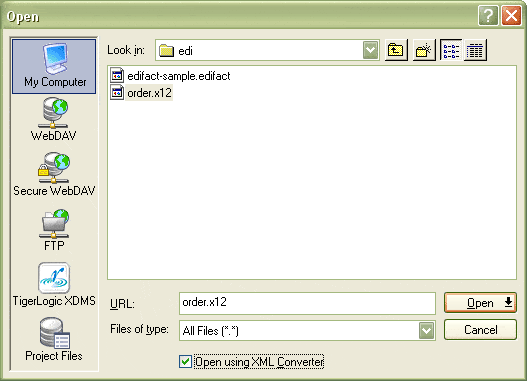
First, use the same File|Open dialog you are used to in other applications to choose the file, except right before hitting Open, put a check in the special box labeled "Open using XML Converter."
Next, select the correct converter, which in this case is the "Electronic Data Interchange (EDI)" converter (which includes X12, EDIFACT, IATA and others).
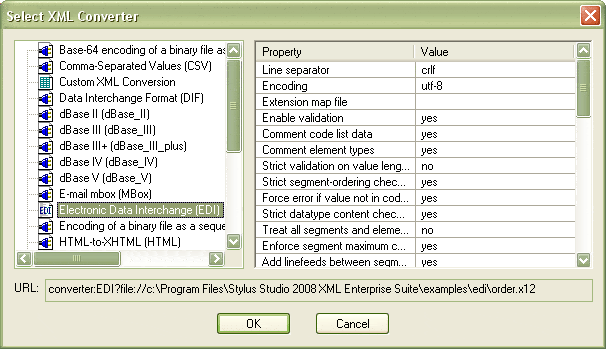
On the right side, there are several options that vary by converter. Changing them changes the URL prefix shown at the bottom of the dialog; you can always use the URL displayed by Stylus Studio to reference the conversion through the XML Converters API or the URI resolver as discussed in the previous examples. Properly formed X12 files will open without any change to the default options, but occasionally you might need to instruct XML Converters to relax some validation, or to format the XML output slightly differently.
|
Description |
Default Value |
URL option |
|
Line separator |
crlf |
newline= |
|
Enable validation |
yes |
val= |
|
Comment code list data |
yes |
decode= |
|
Comment element types |
yes |
field= |
|
Strict validation on value lengths |
no |
len= |
|
Strict segment-ordering checking |
yes |
seg= |
|
Force error if value not in code list |
yes |
tbl= |
|
Strict datatype content checking |
yes |
typ= |
|
Treat all segments as optional |
no |
opt= |
|
Add linefeeds between segments on write |
yes |
eol= |
So, after choosing the filename, checking one checkbox, pressing one button (Open), selecting the converter and pressing another button (OK), we've got a converted file in our XML editor. It’s that easy!
You can use the same process to select the converted X12 file as an input for your XQuery or XSLT that you are developing inside Stylus Studio.