Oracle RAC JDBC Tutorial
Introduction
In today's e-business on-demand environment, more companies are turning to a Grid computing infrastructure for distributed computing and data resources such as processing, network bandwidth, and storage. Grids allow companies to pool available resources for scalability and high availability. Built on Oracle Parallel Server (OPS) architecture, Oracle introduced Real Application Clusters (RAC) with Oracle 9i. Oracle RAC also is a key part of the Oracle 10g release. Oracle RAC allows a single physical Oracle database to be accessed by concurrent instances of Oracle running across several different CPUs.
An Oracle RAC system is composed of a group of independent servers, or nodes, that cooperate as a single system as shown in Figure 1. These nodes have a single view of the distributed cache memory for the entire database system.
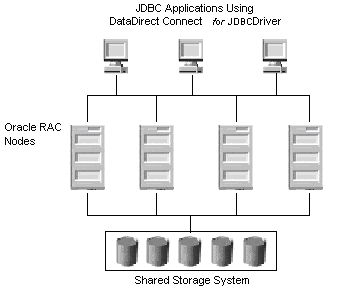
Figure 1: Oracle RAC System
A cluster architecture, such as Oracle RAC, provides applications access to more horsepower when needed, while allowing computing resources to be used for other applications when database resources are not as heavily required. For example, in the event of a sudden increase in traffic, an Oracle RAC system can distribute the load over many nodes, a feature referred to as load balancing.
In addition, an Oracle RAC system can protect against computer failures caused by unexpected hardware failures and operating system or server crashes, as well as processing loss caused by planned maintenance. When a node failure occurs, connection attempts can fail over to other nodes in the cluster, which assume the work of the failed node. When connection failover occurs and a service connection is redirected to another node, users can continue to access the service, unaware that it is now provided from a different node.
This document explains how you can take advantage of Oracle RAC features such as load balancing and connection failover using the DataDirect Connect for JDBC Oracle driver to connect your data critical applications to data.
Connecting to Oracle RAC
Connecting to an Oracle RAC system is similar to connecting to a single instance of an Oracle database. When connecting to a single Oracle database instance, you specify the SID or ServiceName of the instance to which you want to connect either in the connection URL or as properties of a DataSource. For example, the following URL establishes a connection to the database instance Accting1:
jdbc:datadirect:oracle://server1:1521;ServiceName=Accting1In a RAC environment, multiple Oracle instances share the same physical data. In addition to the SID or ServiceName for each Oracle instance in the Oracle RAC system, a ServiceName exists for the entire Oracle RAC system. When an application uses the Oracle RAC system's ServiceName, the Oracle RAC system appears to be a single Oracle instance to the application. For example, the following URL establishes a connection to an Oracle instance in the Oracle RAC system named Accounting:
jdbc:datadirect:oracle://server1:1521:ServiceName=AccountingThe specific instance that is connected to is determined by a number of factors, including which instances are available and the load on those instances. Typically, the application does not need to know which instance to which it is connected.
Retrieving Connection Information from a tnsnames.ora File
DataDirect Connect ;for JDBC Oracle driver also supports retrieving specific connection information, including connection failover and client load balancing instructions, from a tnsnames.ora file. The type of information the DataDirect Connect for JDBC Oracle driver allows you to retrieve from a tnsnames.ora file includes:
- Oracle server name and port
- Oracle System Identifier (SID) or Oracle service name
- Server process type (shared or dedicated)
- Connection failover and client load balancing instructions
tnsnames.ora File Example
In a tnsnames.ora file, connection information for Oracle services is associated with a net service name. The following example shows connection information in a tnsnames.ora file configured for an Oracle RAC system identified by the net service name entry, ARMSTRONG.ACCT.
ARMSTRONG.ACCT =(DESCRIPTION = (ADDRESS_LIST= (ADDRESS= (PROTOCOL = TCP)(HOST = server1)(PORT = 1521))(ADDRESS= (PROTOCOL = TCP)(HOST = server2)(PORT = 1521))(ADDRESS= (PROTOCOL = TCP)(HOST = server3)(PORT = 1521))(FAILOVER = on)(LOAD_BALANCE = on)) (CONNECT_DATA=(SERVICE_NAME = acct.us.yourcompany.com)))If the DataDirect Connect for JDBC Oracle driver referenced the network service name entry ARMSTRONG.ACCT as shown in this example, the driver would connect to the Oracle RAC system identified by the net service name acct.us.yourcompany.com
(SERVICE_NAME=acct.us.yourcompany.com). In addition, the driver would enable connection failover (FAILOVER=on) and client load balancing (LOAD_BALANCE=on) for all connections to that system.
Alternatively, DataDirect Connect for JDBC provides a way to enable connection failover and client load balancing through driver properties specified in a connection URL or data source. For example, the following connection URL enables both of these features:
jdbc:datadirect:oracle//server1:1521;AlternateServers=(server2:1521,server3:1521,server4:1521);LoadBalancing=trueFailover
Oracle RAC systems provide two methods of failover to provide reliable access to data:
- Connection failover. If a connection failure occurs at connect time, the application can fail over the connection to another active node in the cluster. Connection failover ensures that an open route to your data is always available, even when server downtime occurs.
- Transparent Application Failover (TAF). If a communication link failure occurs after a connection is established, the connection fails over to another active node. Any disrupted transactions are rolled back, and session properties and server-side program variables are lost. In some cases, if the statement executing at the time of the failover is a Select statement, that statement may be automatically re-executed on the new connection with the cursor positioned on the row on which it was positioned prior to the failover.
Both connection failover and TAF provide a connection retry feature that allows a connection to be retried automatically until a connection with another RAC node is successfully re-established.
The primary difference between connection failover and TAF is that the former method provides protection for connections at connect time and the latter method provides protection for connections that have already been established. Also, because the state of the transaction must be stored at all times, TAF requires more processing overhead than connection failover.
Connection Failover
Enabling connection failover allows a driver to attempt to connect on another node if the connection attempt on one node fails. When an application requests a connection to an Oracle database server via the driver, the driver does not connect to the database server directly. Instead, the driver sends a connection request to a listener process, which forwards the request to the appropriate Oracle database instance.
In an Oracle RAC system, each active Oracle database instance in the RAC system registers with each listener configured for the Oracle RAC. For example, if we look at the Oracle RAC nodes A, B, and C in Figure 2, Instance A, B, and C are registered with Listener A, B, and C. If the service name in the connection request specifies the RAC system database name, the requested listener selects one of the registered instances to forward the connection request to, based on the load each of the instances is experiencing. For example, if Instance A and B are operating under a heavy load, a connection request to Listener A results in the connection being forwarded to Instance C.
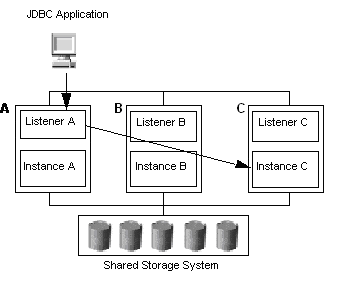
Figure 2: Connection Routing in an Oracle RAC System
Because the requested listener selects from a set of active instances in the RAC to forward connection requests to, it should not route the connection request to an instance that is not running. You may think that connection failover is not needed in an Oracle RAC system; however, if the requested listener is down or the timing of an instance going down is such that the requested listener is not yet aware that an instance is down, the connection request can fail.
The connection failover feature provided by the DataDirect Connect for JDBC Oracle driver handles the case where the requested listener or the server selected by the listener is down by allowing you to specify multiple listeners to which to connect. For example, as shown in Figure 3, if Listener A is down, the DataDirect Connect for JDBC driver can be configured to try Listener B, and then Listener C.
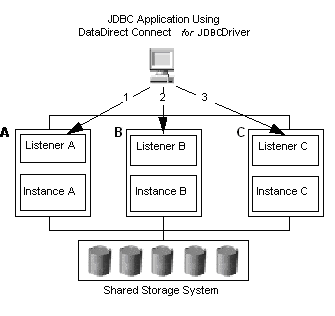
Figure 3: Oracle RAC with Connection Failover
Connection failover provides protection for new connections only and does not preserve states for transactions or queries, so your application needs to provide failure recovery for transactions and queries.
This feature is configured through the AlternateServers connection property of the driver using a connection URL or data source, or through the tnsnames.ora file. The following example shows a connection URL that enables connection failover for the DataDirect Connect for JDBC Oracle driver:
jdbc:datadirect:oracle//serverA:1521;ServiceName=TEST;AlternateServers=(serverB:1521,serverC:1521)
Transparent Application Failover (TAF)
With TAF, if a communication link failure occurs after a connection is established, the connection is moved to another active Oracle RAC node in the cluster without the application having to re-establish the connection. For example, suppose you have the Oracle RAC environment shown in Figure 4 with multiple connections to Oracle RAC nodes: A, B, and C. As shown in the first case, connections are distributed among the nodes in an Oracle RAC system.
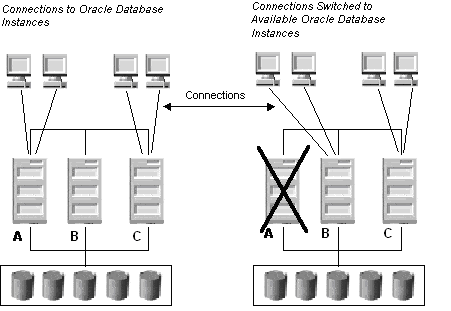
Figure 4: Transparent Application Failover (TAF)
When a communication link failure occurs between an Oracle node and the application as shown in the second case, the driver automatically switches the connection to another available node.
When a user session fails over to an alternate RAC node, the following items are not persisted to the failover node and must be reinitialized by the application:
- In-use stored procedures
- Application changes to session state
- In-flight "write" transactions (local transactions doing database updates)
- Global transactions
Although Oracle documentation refers to this functionality as transparent, the preceding list shows that it is not completely transparent to an application. The application programmer must include code to handle the necessary "clean-up" caused by rolled back transactions or lost session states. Because of these restrictions, the situations where application failover is beneficial when implemented by the driver are limited.
Applications can perform a failover using the DataDirect Connect for JDBC Oracle driver by performing the following steps.
- Catch the communication error exception generated by the driver.
- Take the necessary steps to deal with current transactions that were rolled back.
- Re-establish the connection to the server.
- Re-initialize the session state.
- Re-run any transaction that was rolled back.
To make it easy for applications to detect when the connection with the server is lost, all communication error exceptions thrown by the DataDirect Connect for JDBC drivers have a SQL state that begins with 08.
Oracle's TAF implementation in their OCI driver performs Step 3 in the preceding list for the application and may perform Step 5 for the application if the only operation in the transaction is a Select statement.
Connection Retry
DataDirect Connect for JDBC drivers provide a connection retry feature that works with connection failover. You can customize the driver to attempt to reconnect a certain number of times and at a certain time interval. For example, the following connection URL:
jdbc:datadirect:oracle//server1:1521;ServiceName=TEST;AlternateServers=(server2:1521,server3:1521,server4:1521);ConnectionRetry=10;ConnectionDelay=10instructs the driver to cycle through the list of servers (the primary server and alternate servers) up to 10 more times if the driver was unable to establish a connection to any of the servers in the list during the initial pass. The driver waits 10 seconds before it cycles through the list of servers again.
Connection retry can be an important strategy in recovering from failures that bring down an Oracle RAC system. For example, suppose you have a power failure scenario in which both the client and the Oracle RAC system go down. When the power is restored and all computers are restarted, the client may be ready to attempt a connection before an Oracle RAC system has completed its startup routines. If connection retry is enabled, the client application would continue to retry the connection until a connection is successfully accepted by a node in the Oracle RAC system.
Load Balancing
Oracle RAC systems provide two types of load balancing for automatic workload management:
- Server load balancing distributes processing workload among Oracle RAC nodes.
- Client load balancing distributes new connections among Oracle RAC nodes so that no one server is overwhelmed with connection requests. For example, when a connection fails over to another node because of hardware failure, client load balancing ensures that the redirected connection requests are distributed among the other nodes in the RAC.
The primary difference between these two methods is that the former method distributes processing and the latter method distributes connection attempts.
Server Load Balancing
With Oracle9i RAC systems, a listener service provides automatic load balancing across nodes. The query optimizer determines the optimal distribution of workload across the nodes in the RAC based on the number of processors and current load.
Oracle 10g also provides load-balancing options that allow the database administrator to configure rules for load balancing based on application requirements and Service Level Agreements (SLAs). For example, rules can be defined so that when Oracle 10g instances running critical services fail, the workload is automatically shifted to instances running less critical workloads. Or, rules can be defined so that Accounts Receivable services are given priority over Order Entry services.
The DataDirect Connect for JDBC Oracle driver can transparently take advantage of server load balancing provided by an Oracle RAC without any changes to the application. If you do not want to use server load balancing, you can bypass it by connecting to the service name that identifies a particular RAC node.
Client Load Balancing
Client load balancing helps distribute new connections in your environment so that no one server is overwhelmed with connection requests. When client load balancing is enabled, connection attempts are made randomly among RAC nodes. You can enable client-side load balancing for DataDirect Connect for JDBC connections through either the LoadBalancing driver property using a connection URL or data source or through the LOAD_BALANCE connect descriptor parameter in the tnsnames.ora file.
Suppose you have the Oracle RAC environment shown in Figure 5 with multiple Oracle RAC nodes, A, B, C, and D. Without client load balancing enabled, connection attempts may be front-loaded, meaning that most connection attempts would try Node A first, then Node B, and so on until a connection attempt is successful. This creates a situation where Node A and Node B can become overloaded with connection requests.
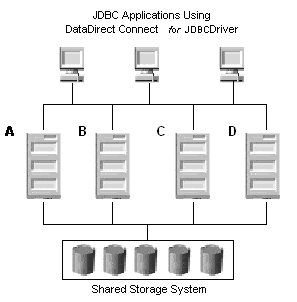
Figure 5: Client Load Balancing
With client load balancing enabled, connection attempts are made randomly throughout the Oracle RAC system. For example, Node B may be tried first, followed by Node D, C, and A. This makes it less likely that any one node in the Oracle RAC system will be so overwhelmed with connection requests that it may start refusing connections.
For example, the following connection URL enables client load balancing for the DataDirect Connect for JDBC Oracle driver:
jdbc:datadirect:oracle//server1:1521;ServiceName=TEST;AlternateServers=(server2:1521,server3:1521,server4:1521);LoadBalancing=trueSummary
A cluster architecture, such as Oracle RAC, provides applications with many advantages such as connection failover and load balancing. DataDirect Connect for JDBC provides full support for these important features to help make your business more flexible and agile in today's computing environment, where scalability and data availability is critical.
In addition to its support for Oracle, DataDirect Connect for JDBC supports connection failover and load balancing for all major databases, including IBM DB2, Microsoft SQL Server, Informix, and Sybase.