Using Oracle Database Gateway for ODBC
Introduction
Heterogeneous Services and Database Gateway for ODBC allow Oracle ODBC customers to access and integrate non-Oracle data sources, offering flexibility in multi-database environments.
Using Database Gateway for ODBC Oracle requires optimal connectivity to ensure the best application performance. DataDirect Connect for ODBC Oracle drivers deliver the most scalable and best performing connectivity Oracle Database Gateway.
Architecture
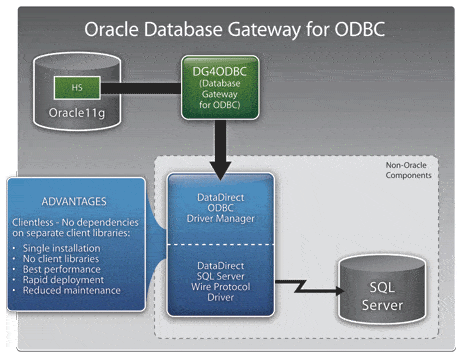
The Oracle Database Gateway for ODBC is implemented by using a Heterogeneous Services ODBC agent. An ODBC agent is one of the gateways available with the Oracle Database Gateway software.
To access a non-Oracle data store using the Database Gateway for ODBC Oracle, the agent works with an ODBC driver. The ODBC driver must be on the same platform as the ODBC agent. The non-Oracle data stores can reside on the same machine as the Oracle database or a different machine. The Database Gateway can also reside on a separate machine from the Oracle server.
Diagram: Using the DataDirect SQL Server ODBC Driver
Download the PDF tutorial "Using DataDirect Connect64 for ODBC with the Oracle Database Gateway for ODBC."